Laptop Buying Guide: Specs That Actually Matter
When you want to buy a laptop, the list of things to consider in buying a laptop can be very long and confusing. You may be in university and need it for research and writing papers. Or you may have started a job or a side hustle and need a reliable machine for work.
The truth is, you need a laptop that can move from school to work without any problem. You need a laptop for the long run, for many years to come.
This guide will show you the specs that truly matter. Because buying a laptop is an investment in your education, your career, and your ability to make money from anywhere, at any time.
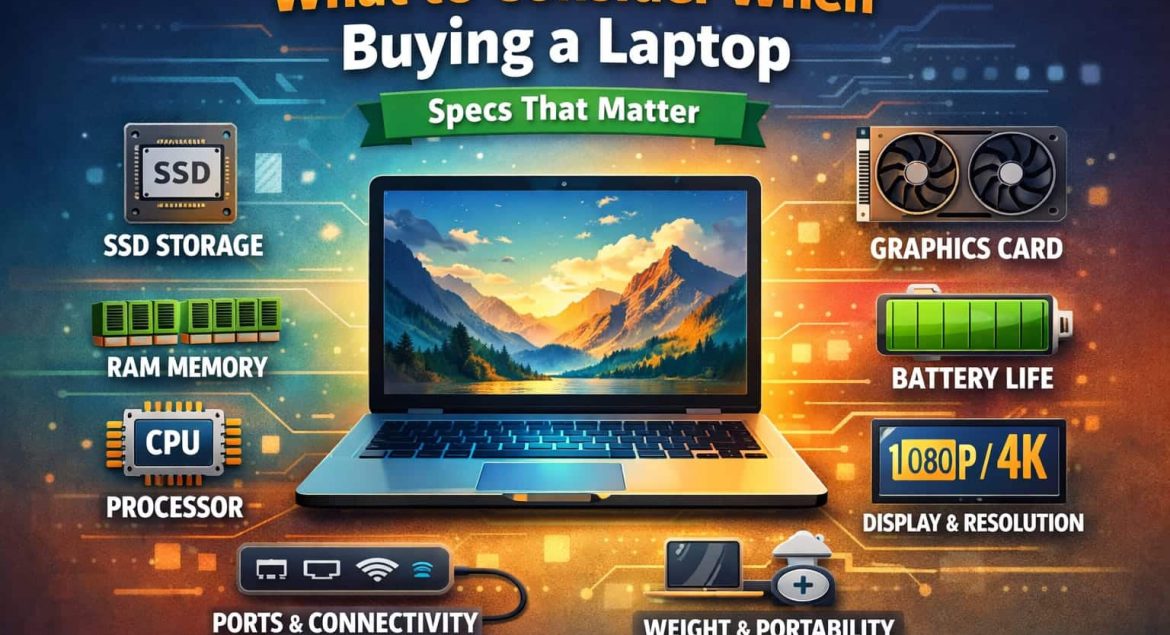
1. RAM
RAM is like the space on your desk. If your desk is small, you can only have one or two books open at a time. To look at a third book, you must close one. This makes work slow and frustrating.
But if you have a big desk, you can have all your books, your notepad, and your calculator open at the same time. You can work quickly and switch tasks easily. That is what RAM does for your laptop.
RAM is the short-term memory your laptop uses to run programs. More RAM means your laptop can handle more tasks at once without slowing down. Look for at least 8GB of RAM. But if you can manage it, 16GB of RAM is the sweet spot.
2. CPU
The CPU is the brain of your laptop. Every single command you give, from typing a document to editing a video, goes through the CPU. So, you need a good, strong brain.
Now, you will see many names, such as Intel Core i3, i5, and i7, and AMD Ryzen 3, 5, and 7. Here is the simple truth: School and work need an Intel Core i5 or an AMD Ryzen 5 processor. It’s powerful to handle your research, reports, spreadsheets, and even photo editing without any struggle.
An i3 or Ryzen 3 might save you some money now, but it will feel slow much faster. And an i7 or Ryzen 7 is often more power than you need but costs more money.
3. Storage
Storage is where you keep all your files. There are two main types: the old HDD (Hard Disk Drive) and the new SSD (Solid State Drive).
An HDD has lots of space for a low price, but it is slow. Starting your laptop takes time. Opening programs takes time. Saving files takes time.
An SSD, on the other hand, is like a very fast, electronic flash drive. It makes everything incredibly fast. Your laptop starts in seconds. Programs open immediately. Your whole experience is smooth.
You must choose an SSD; there’s no debate here. The speed difference is like day and night. So, look for a laptop with an SSD. Even if it’s 256GB, it’s better than a 1TB HDD. You can always use a cheap external hard drive or cloud storage for extra files. But you cannot make an HDD laptop fast.
4. Graphics Card (GPU)
Many people think a graphics card is only for playing heavy video games. That’s not entirely true. The graphics card, or GPU, handles everything you see on the screen.
Most laptops have a simple graphics processor built into the CPU. This is called integrated graphics. In most school and office work, integrated graphics is perfectly fine.
However, if your work or studies involve design, video editing, 3D modeling, or architecture, then you need a dedicated graphics card. Brands like NVIDIA and AMD make these. If you are doing any of these creative or technical tasks, then a dedicated GPU becomes one of the key things to consider in buying a laptop.
For everyone else, the integrated graphics that come with an Intel i5 or AMD Ryzen 5 will be more than enough. Do not pay extra for a powerful graphics card if you will not use it.
5. Display
You will stare at this screen for hours every day, so look for two main things: size and quality.
A 14-inch screen is a good balance between portability and space. But a 15.6-inch screen is the most common and gives you more room to work, which is better for long hours.
Next is resolution. Do not buy a laptop with a screen resolution of only 1366 x 768. This is called HD. The text and images will not be very sharp. You must aim for Full HD (1920 x 1080). This is also called FHD or 1080p. This resolution is the standard for clear, sharp, and comfortable viewing. It makes reading documents and browsing websites much easier on your eyes.
6. Battery Life
In Kenya, power can be unpredictable. And in school or a coffee shop, you may not always find a socket. So, battery life is freedom.
When you look at battery life, do not just believe the number on the box. Look for real-world reviews. Buy a laptop that can promise at least 6 to 8 hours of real use. This means using Wi-Fi, working on documents, and having a few browser tabs open. A good battery means you can attend all your lectures, work from the library all afternoon, or run your side hustle from a park without carrying your charger.
Final Word
Choosing a laptop for school and for your career is a big decision. The goal is to focus your money on what truly matters for your daily life and your future work.
Remember, a good laptop is a tool for creating opportunities and learning new skills that make you money. Do not get caught up in fancy ads or features you will never use. Go back to this list of things to consider in buying a laptop.