Maximizing Cost Savings and Productivity with a Konica Minolta Digital Copier for Commercial Businesses
Are you tired of constantly overspending on printing costs and wasting valuable time with outdated copiers? Look no further! In today’s fast-paced business world, staying ahead requires both cost savings and enhanced productivity. That’s why we’re here to introduce the game-changer: a Konica Minolta Digital Copier designed specifically for commercial businesses. Say goodbye to expensive ink cartridges and hello to crisp, vibrant prints that will wow your clients. Join us as we delve into the countless benefits of this cutting-edge technology, uncovering how it can revolutionize your workflow while maximizing your savings – so you can focus on what really matters: growing your business.
Introduction to Graphics Color Digital Copiers:
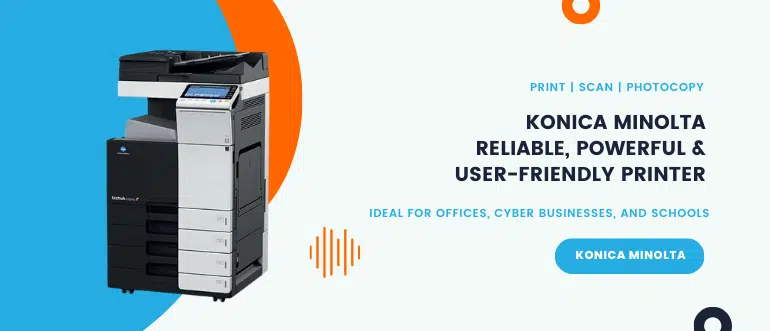
Konica Minolta digital copiers are an essential tool for any commercial business that deals with large quantities of printed materials. These advanced machines have revolutionized the way businesses handle their printing needs, offering cost savings, increased productivity, and superior print quality.
In simple terms, a Konica Minolta digital copier is a multifunctional device that can copy, scan, print and fax documents in full-color or black and white. Unlike traditional analog copiers, these modern machines use digital technology to capture and reproduce images with exceptional clarity and detail.
The main advantage of choosing a Konica Minolta copier over a traditional printer or copier is its ability to produce high-quality prints at a faster pace. With advanced features such as automatic duplexing (double-sided printing), multiple paper trays for different paper sizes, and high-speed printing capabilities, these machines can handle large volume jobs quickly and efficiently.
Moreover, the use of toner cartridges instead of ink cartridges results in lower operating costs. Toner cartridges last longer than ink cartridges and are more cost-effective in the long run. Additionally, some models also offer eco-friendly features like energy-saving modes and automatic shut-off options when not in use, reducing overall energy consumption.
But perhaps one of the most significant advantages of using a Konica Minolta digital copier is the versatility it offers. These machines allow businesses to produce professional-quality documents ranging from simple text-based reports to complex marketing materials with colorful images and charts. The ability to scan documents directly into electronic formats also makes it easier to archive important files digitally for easy accessibility.
Konica Minolta digital copiers have come a long way since their inception. Today’s models offer advanced features such as wireless connectivity options that allow employees to print from anywhere within the office network. Some models even support mobile printing applications which enable users to print directly from their smartphones or tablets.
Investing in a graphics color digital copier can bring many benefits to a commercial business, including cost savings, increased productivity, and improved print quality. With its advanced features and capabilities, this multifunctional device is a valuable asset that can help businesses stay competitive in the modern market. In the following sections of this article, we will explore how to choose the right graphics color digital copier for your business needs and how to maximize its potential to achieve maximum cost savings and efficiency.
Benefits of Using a Konica Minolta Digital Copier for Commercial Businesses
A Konica Minolta digital copier is an essential piece of equipment for commercial businesses. It offers a wide range of benefits that can help maximize cost savings and productivity in the workplace. In this section, we will discuss the various advantages of using a Konica Minolta digital copier.
- High-Quality Color Printing
One of the major benefits of using a Konica Minolta digital copier is its ability to produce high-quality color prints. With vibrant colors and sharp details, these machines are perfect for businesses that require professional-looking documents, such as marketing materials or brochures. This feature can give your business a competitive edge by making your promotional materials more eye-catching and memorable.
- Versatility
Konica Minolta digital copiers are incredibly versatile, offering an array of functions beyond just printing. These machines also have scanning, copying, and faxing capabilities, making them useful for various tasks in the office. You can easily scan important documents directly to email or network folders, make copies of important contracts or proposals, and send faxes without needing separate equipment.
- Cost Savings
In today’s business landscape, cost efficiency is crucial for any organization’s success. Investing in a Konica Minolta digital copier can lead to significant cost savings in the long run compared to traditional printers. These machines use toner instead of ink cartridges, which means they have a much lower cost-per-page ratio than inkjet printers.
Moreover, having all-in-one functionality eliminates the need for multiple devices, reducing maintenance costs and saving valuable office space.
- Increased Productivity
The speed at which a Konica Minolta digital copier operates significantly contributes to increased productivity in the workplace. With faster print speeds compared to traditional printers and photocopiers, you can quickly produce large volumes of high-quality prints without sacrificing quality.
Factors to Consider When Choosing a Graphics Color Digital Copier for Your Business
When it comes to choosing a Konica Minolta digital copier for your business, there are several factors that you should carefully consider. This decision can greatly impact the productivity and cost savings of your business, so it is important to take the time to evaluate your options and choose the right copier for your specific needs.
- Printing Speed and Volume: One of the first things to consider when selecting a graphics color digital copier is its printing speed and volume capabilities. Depending on the size of your business and how much printing you do on a daily basis, you will need a copier that can handle the workload efficiently. Look for a copier with high pages per minute (ppm) output and a large paper tray capacity to ensure efficient printing.
- Print Quality: As we’re talking about graphics color digital copiers, print quality is another crucial factor to consider. The resolution of the copier determines how sharp and clear your prints will be, so make sure to look for a high dpi (dots per inch) resolution for optimal results.
- Scanning Capabilities: In today’s fast-paced digital world, scanning capabilities are essential in any office setting. Make sure that the graphics color digital copier you choose has advanced scanning features such as scan-to-email or scan-to-cloud options. This will not only save time but also improve efficiency by allowing easy access to scanned documents.
- Wireless Connectivity: With more businesses transitioning towards remote work or having employees working from different locations, having wireless connectivity in your graphics color digital copier is becoming increasingly important. This feature allows users to easily print from their mobile devices or laptops without requiring physical connection to the printer.
- Cost Efficiency: Investing in a new graphics color digital copier can be costly, so it’s important to evaluate long-term cost efficiency when making this decision. Some key factors that affect cost include toner usage, maintenance costs, and energy consumption. Look for copiers with energy-saving features and low-cost maintenance options to reduce your overall expenses.
- User-Friendly Interface: A user-friendly interface is essential for efficient usage of the copier in a busy office environment. Look for a copier with an intuitive touch screen display and easy navigation buttons to make printing, scanning, and copying tasks quick and effortless.
Selecting the right graphics color digital copier for your business requires careful consideration of various factors such as printing speed, print quality, scanning capabilities, connectivity options, cost efficiency, and user-friendliness. By taking these factors into account, you can maximize cost savings and productivity in your commercial business with the right graphics color digital copier.
Tips for Maximizing Cost Savings and Productivity with a Konica Minolta Digital Copier
If you’re a business owner, you understand the importance of cost savings and productivity in order to stay competitive in today’s market. One tool that can greatly assist with both of these goals is a Konica Minolta copier. This advanced technology not only allows for high-quality printing, but it also offers various features that can help your business save money and increase efficiency.
In this section, we’ll discuss some tips for maximizing cost savings and productivity with a Konica Minolta digital copier.
- Utilize Duplex Printing
One way to save on paper costs is by utilizing duplex printing, which allows you to print on both sides of the paper automatically. This feature not only saves on paper usage but also reduces printer downtime as employees won’t have to manually flip the pages.
- Choose High-Quality Toner
Investing in high-quality toner may seem like an added expense, but in the long run, it can actually save your business money. Cheaper toners tend to produce lower quality prints and require more frequent replacements, resulting in higher overall costs. Higher quality toners produce sharper images and last longer, reducing the need for frequent replacements.
- Take Advantage of Cloud Printing
Many modern Konica Minolta digital copiers offer cloud printing capabilities, allowing employees to access documents from anywhere and print them directly from the cloud without having to download or transfer files first. This feature not only saves time but also eliminates the need for additional software or equipment.
- Use Energy Saving Features
Save on energy costs by taking advantage of the energy-saving features available on most graphics color digital copiers. These features include automatic shut-off when not in use and low-power modes that reduce energy consumption while still allowing quick start-up times.
- Monitor Usage and Set Restrictions
Keeping track of print usage can help identify areas where cost savings can be made. Many printers offer reporting tools that allow you to see how much each employee is printing, which can help identify any excessive usage. You can also set restrictions and limits on print volumes to prevent unnecessary or excessive printing.
- Invest in a Service Plan
To ensure your Konica Minolta digital copier operates at its best, it’s important to invest in a service plan. Regular maintenance and repairs can prolong the lifespan of your printer, saving you money in the long run by reducing the need for costly replacements.
By utilizing these tips, you can maximize cost savings and productivity with a graphics color digital copier for your commercial business. Take advantage of the advanced features offered by modern printers to not only save money but also increase overall efficiency and streamline workflows.
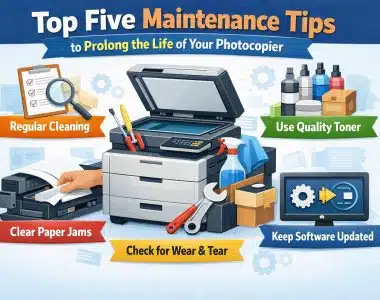
How to Maintain and Repair Your Konica Minolta Digital Copier
Maintaining and repairing your graphics color digital copier is essential for ensuring its longevity and maximizing its cost savings and productivity. Here are some tips on how to properly maintain and repair your Konica Minolta digital copier.
- Regular Cleaning:
Regularly cleaning your graphics color digital copier is crucial for keeping it in good working condition. Dust, dirt, and debris can build up inside the machine, clogging the internal components and affecting its performance. Use a soft cloth or compressed air to remove any dust or debris from the exterior of the copier, particularly around the paper trays and feeders.
- Replace Consumables:
The consumable parts of a graphics color digital copier, such as toner cartridges, imaging drums, and fuser units need to be replaced regularly to ensure high-quality prints. Make sure to use genuine replacement parts recommended by the manufacturer for optimal results.
- Check Paper Quality:
Using low-quality or incompatible paper can cause jamming and damage to your graphics color digital copier. Always check that you are using the right type of paper recommended by the manufacturer for your specific model.
- Calibrate Your Copier:
Calibrating your copier periodically will help maintain consistent print quality over time. The process involves adjusting various settings such as density, contrast, sharpness, etc., based on the type of document being printed.
- Monitor Error Messages:
If your graphics color digital copier displays an error message, do not ignore it as it could indicate a problem that needs attention. Consult the user manual or contact customer support for assistance in troubleshooting the issue before it escalates into a more significant problem.
- Troubleshooting Common Problems:
Some common issues that may arise with a Konica Minolta digital copier include paper jams, streaky prints, poor image quality, etc., which can often be resolved by following simple troubleshooting steps outlined in the user manual or online resources provided by the manufacturer.
- Regular Maintenance:
It is essential to schedule regular maintenance checks for your graphics color digital copier by a certified technician. They can perform necessary tasks such as cleaning, lubricating, and replacing parts that may wear out over time.
Following these maintenance and repair tips will help keep your Konica Minolta digital copier in optimal condition, prolonging its lifespan and ensuring maximum cost savings and productivity for your commercial business. Remember to always refer to the user manual or consult with customer support for any specific instructions related to your model of copier.